
Parking Taxi Driver
Master tight spots in a cab driving simulator with realistic parking physics, keyboard driving controls, and time-based missions. Play free unblocked.
About Parking Taxi Driver
Slide into the driver’s seat of a bright yellow cab and test your finesse in a taxi parking game online that values skill over speed. You’ll weave through narrow alleys, squeeze between bumpers, and line up perfectly within the paint. Expect realistic parking physics, clear visual cues, and a rewarding loop of short missions that sharpen your instincts one stop at a time. Prefer clean runs? This experience treats smoothness like a high score.
Every mission nudges you to learn more about traffic flow, spacing, and timing. It’s a compact cab driving simulator with punchy levels, punchier feedback, and that cozy “one more try” feel. Whether you’re here for traffic rules practice or you just want quick, zen-like parking sessions, the game welcomes you with a simple setup and meaningful mastery.
Getting Started
Parking Taxi Driver loads right in your browser, so there’s no download or signup delay. Hit play, choose your first route, and follow the arrows to your spot. The tutorial softly introduces steering, braking, and camera cycling, so you can focus on rhythm instead of menus. New to city driving challenges? The early missions are gentle, giving you time to learn without pressure while still offering room for improvement.
As you progress, the streets get busier and the spaces get tighter. Parking Taxi Driver guides you with clear cones, parking outlines, and guardrails that punish reckless moves just enough to teach better habits. Take a breath, line up, and enjoy the process—precision is the point here.
Setup & Launch
Click to launch, allow the game to initialize, and you’re ready to roll. Parking Taxi Driver runs smoothly in modern browsers; keep a few tabs closed and hardware acceleration on for best performance. Audio levels, camera toggle, and sensitivity live in accessible menus. If your device supports it, you can even explore gamepad steering support for a more analog, car-like feel while you practice gentle turns and soft braking.
On lower-end machines, reduce effects in the options menu for consistent frame pacing. Parking Taxi Driver doesn’t need a beastly rig. It just needs steady inputs and a calm approach, especially when threading through tight cars or angling into a snug space off a busy lane.
Core Rules & Systems
Missions are simple: drive to the target and park inside the marked lines without collisions. Parking Taxi Driver grades your run with stars based on time, accuracy, and damage taken. You’ll see cones, arrows, and a bright parking box—get your wheels straight and your bumper inside the lines for full credit. Clipping walls or other cars costs health and points. Finish within the window, avoid bumps, and you’ll climb the ranks fast.
Under the hood, the game uses realistic parking physics to make every input count. Light taps on the brake, careful feathering of the throttle, and tight steering angles separate a clean park from a sloppy one. Parking Taxi Driver rewards patience as much as speed, so learn to read approach paths, use mirrors and camera angles, and give yourself room to correct mistakes before committing.
Controls
The default keyboard driving controls are intuitive: arrows or WASD for steering and throttle, space for brake, and a key to reset if you get stuck. Parking Taxi Driver emphasizes fine control, so short taps beat long presses. For camera tweaks, cycle views until you find one that shows both your rear bumper and the slot edges. That’s your sweet spot for sharp alignment and gentle adjustments.
- Steer with small, rhythmic inputs to avoid overcorrection.
- Brake early, then release to roll into position.
- Use reverse in short bursts to manage angle and distance.
- Toggle cameras to judge corners and bumper clearance.
Controller Support (Gamepad)
If you prefer analog feel, plug in a gamepad and enable support in the options. Parking Taxi Driver responds well to gradual stick movement and soft trigger pressure. It’s great for parallel parking practice because the analog stick lets you set precise angles without fighting the keyboard’s on/off nature. Adjust sensitivity until small thumb motions translate to small front-wheel angles, then let muscle memory take over.
Difficulty Options
Progression eases you in, then ramps up with tighter spaces, heavier traffic, and trickier approaches. Parking Taxi Driver doesn’t rely on brutal penalties; it nudges you to drive smarter. Later levels mix time-based missions with narrower margins for error, so you’ll value clean entry lines and steady speed. If you feel rushed, restart and nail the angles—consistency beats reckless acceleration.
Game Modes
You’ll find a main mission path plus optional challenge stages that spotlight specific skills. Parking Taxi Driver keeps things focused: short levels, immediate feedback, and rapid retries that respect your time. Want to drill a single maneuver? Pick a mission that matches your goal, practice the entry, then layer in speed once your lines look razor-straight.
Mastering Tight City Parking: Tips for New Taxi Drivers
Start wide, finish narrow. Approach the bay at a shallow angle, then unwind the wheel smoothly as your front bumper passes the front line. Parking Taxi Driver rewards early planning, so pick an aim point—like the rear corner of the space—and use it to guide your arc. Keep your speed low enough that a single brake tap can stop you within a car length without drama. That control makes every correction cheaper.
Use landmarks: lane stripes, curb textures, and the edges of parked cars. In a cab driving simulator, reference points build consistency. Parking Taxi Driver turns these micro-skills into macro gains once you repeat them mission after mission, translating calm technique into shiny stars.
Beginner’s Guide: First 10 Missions Explained
The opening batch eases you into straight-in parks, gentle reverses, and basic camera toggles. Parking Taxi Driver teaches you to square the wheel before stopping, straighten the chassis, and center within the box. Expect forgiving timers with light traffic. Use this phase to build a routine: stop, observe, commit, correct. When a mission adds a tighter lane, take an extra second to set your entry line—those seconds are cheaper than a redo.
Advanced Maneuvers: Parallel, Reverse, and Angle Parks
Parallel parking practice starts with position. Pull forward until your rear axle lines up with the other car’s bumper, turn sharply, and glide in until your mirror meets the slot’s back corner. Then counter-steer to straighten. For reverse parking tips, keep the wheel straight while rolling back, then add steering in small doses. Angle parking is about timing—begin turning just before your front bumper reaches the bay marker for a clean, single-sweep entry.
Parking Taxi Driver makes these moves feel authentic without being punishing. When your angle’s off, ease out, reset, and try again. It’s better to re-approach than to force it and clip a fender. With practice, you’ll place the cab like a pro.
Drift Control vs Precision Braking: Which Works Best?
Drift looks cool, but sliding wastes distance and control. Parking Taxi Driver favors precision braking. Brake in a straight line, release into the turn, and reapply gently if you roll too far. That rhythm preserves alignment and keeps the car planted. In tight bays, a stable chassis beats flashy slides every time, especially when you’re threading between traffic cones or easing past a long sedan into a narrow pocket.
Earning Stars Faster: Time, Damage, and Bonus Objectives
Every star starts with clean driving. Minimize bumps, stay inside the lines, and watch your timer. Parking Taxi Driver often adds optional goals like zero damage or no cones hit—treat those as free points for staying disciplined. Time-based missions are won in the setup, not the sprint. Approach wide, commit to a single smooth arc, and avoid jerky mid-turn corrections that bleed seconds.
If you’re chasing perfect ratings, memorize a mission’s traffic rhythm. Parking Taxi Driver repeats certain patterns, so you can anticipate gaps and plan a quicker entry. One great line beats three sloppy ones, and a calm reset is faster than wrestling a bad angle.
Best Camera Views for Clean Parking Lines
Pick a view that shows your rear bumper and both side boundaries at once. Parking Taxi Driver includes options that hug the car or give a wider field. For tricky reverses, a lower, closer camera helps you judge depth. For longer approaches, pull back for context so you see curb edges and hazards. Switch as needed—there’s no rule saying one view must do everything.
Traffic AI Behavior: Reading Patterns and Avoiding Collisions
Traffic follows predictable cycles. Watch how cars bunch at corners, leave gaps near junctions, and slow for turns. Parking Taxi Driver rewards observation; if you hesitate and read the pattern, you’ll find a clean window to slip through. When in doubt, pause short of the flow, then roll in behind a passing car to use its wake as cover. Safe, smart, stylish.
Controller vs Keyboard: Choosing the Smoothest Handling
Keyboard taps excel at crisp corrections and quick restarts, which suits short, surgical missions. Gamepads shine for micro-angles and feathered throttle. Parking Taxi Driver plays well with both: use keyboard driving controls if you like binary precision, or lean on gamepad steering support if analog finesse is your thing. Swap mid-session to see which tool fits the mission’s personality.
Whichever you choose, build a routine. Parking Taxi Driver rewards consistent inputs, steady braking, and early camera checks. Keep your approach calm, let the physics guide your timing, and those clean three-star finishes will stack up fast across every route in the city.
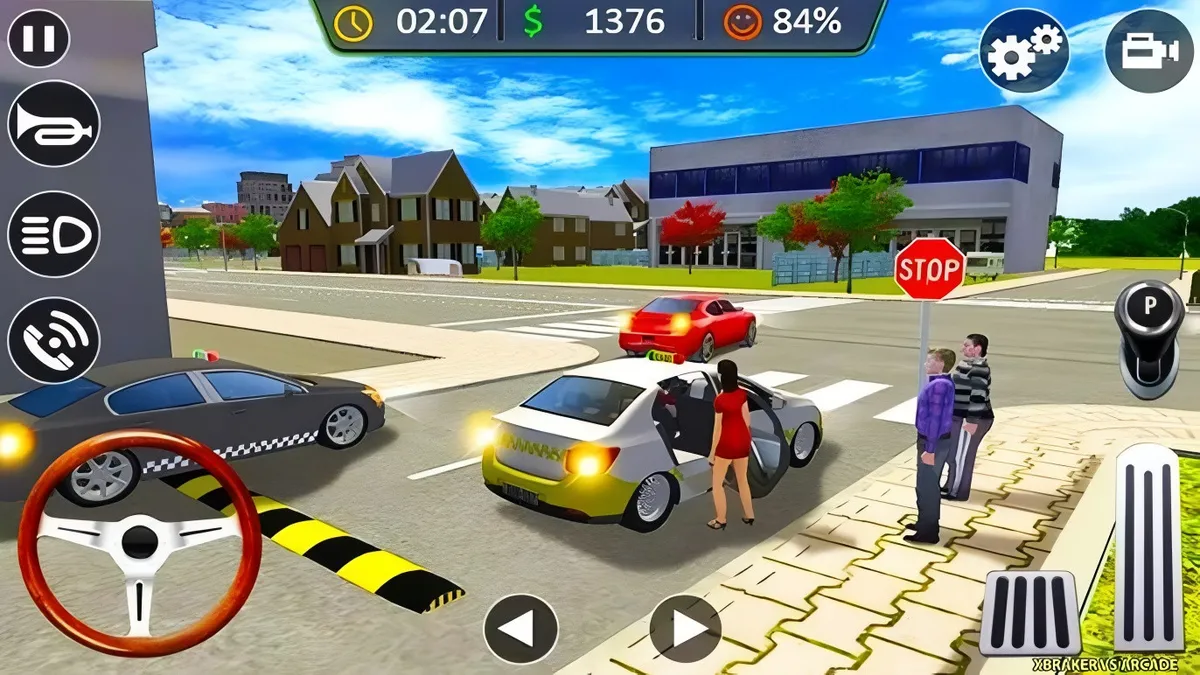
Single-Player vs Multiplayer
Parking Taxi Driver is built around focused solo play. It puts you in the hot seat with tight routes, ticking clocks, and precise parking spots. There is no real-time PvP here, but you still chase bragging rights through star ratings and clean runs. That loop makes Parking Taxi Driver a free browser car game you can jump into for a few minutes or grind for a new personal best.
Because the missions are compact, single-player shines. You control pace, camera, and lines, and there’s zero wait time. That makes Parking Taxi Driver a friendly driving game for kids and a satisfying skill sandbox for adults. Want competition anyway? Race your own ghosts, share times with friends, and compare stars to see who really mastered those tight alley turns.
Key Features
- Precision parking challenges that reward clean lines and calm braking in Parking Taxi Driver.
- Multiple camera view options to suit each scenario, from cockpit to chase camera.
- Responsive tuning that lets you adjust vehicle handling sensitivity to match your style.
- Touch-friendly UI and mobile touch controls for phones and tablets.
- Score systems that grant reward stars and coins for efficient, damage-free rides.
- Streamlined loading, so Parking Taxi Driver pops open fast in your browser and gets you driving.
Heroes & Skills
There are no capes here; the hero is you. Parking Taxi Driver celebrates urban driving skills: mirror checks, lane discipline, and tight-space awareness. You’ll level up your craft through repetition and feedback. The more you commit to smooth inputs, the sooner Parking Taxi Driver lets you flow through traffic without panic.
- Steering finesse: minimal wheel movement, no sawing back and forth.
- Brake modulation: short, progressive squeezes to keep the nose stable.
- Throttle feathering: gentle launches so you don’t break traction.
- Spatial awareness: read curbs, cones, and bumpers with a glance.
- Route memory: recall safe shortcuts and one-ways to shave seconds.
Items & Boosts
Depending on the build you play, upgrades often focus on consistency rather than raw speed. Think better tires for grip, stronger brakes, or a sturdier bumper to help avoid car damage. Some versions include cosmetic liveries or minor time-saving perks unlocked with coins. Nothing pay-to-win; the biggest boost is cleaner driving.
- Tire compounds: increase traction in wet or night conditions for steadier launches.
- Brake kits: shorten stopping distance and improve pedal feel.
- Steering rack tweaks: refine turn-in for tighter spaces.
- Meter skins and taxi decals: personalize your cab without changing handling.
All of it complements your technique. Parking Taxi Driver rewards habits, not shortcuts, so upgrades feel like polish on top of solid fundamentals.
Saving & Continuing
Progress typically saves to your browser. Stars, coins, and unlocked stages stick around so you can continue later. If you clear cache or switch devices, you may lose local data, so keep that in mind. Some portals add account-based sync, but local storage is the default for Parking Taxi Driver.
If you’re in a restricted network, you may still play unblocked at school on certain domains, depending on your admin’s filters. If you prefer offline parking games, use those for practice on the go, then hop back into Parking Taxi Driver for leaderboard-level precision once you’re online.
Points & Rewards
The score is simple on the surface and deep beneath. Parking Taxi Driver tallies route time, parking accuracy, and penalties. Keep bump-free runs and nail the bay with minimal correction to collect reward stars and coins. Build streaks for bigger payouts and chase that S-rank.
- Perfect park: center the cab, straight wheels, no overhang.
- Clean drive: avoid car damage and traffic infractions.
- Time bonus: finish early without reckless risks.
- Combo streak: stack clean missions in Parking Taxi Driver for escalating rewards.
Options & Accessibility
Fine-tune your comfort, clarity, and control. Parking Taxi Driver includes practical toggles to reduce friction, improve readability, and support different devices. These quality-of-life settings help you settle into a rhythm fast.
- Camera view options: switch between chase, hood, and cockpit to read space better.
- Vehicle handling sensitivity sliders: adjust steering curve and pedal response.
- Mobile touch controls: on-screen wheel or arrows, plus customizable zones.
- Audio cues: engine and tire sound hints for grip and braking.
- Visual clarity: high-contrast UI elements for quick glance checks in Parking Taxi Driver.
Parking Taxi Driver Fullscreen Mode
(press Fullscreen button under the game window)
Fullscreen hides distractions and makes depth cues easier to judge in Parking Taxi Driver. It’s perfect for threading tight alleys and lining up that final reverse into a narrow bay.
How to Nail S-Rank on Hard Mode Challenges
Hard Mode changes expectations from quick to precise. The safest path to S-rank starts before the clock with a plan: camera choice, route preview, and a target pace. Use a stable camera, then commit to short steering inputs. Brake early, roll gently, and square the car before reversing. Parking Taxi Driver will reward you for a neat, single-motion park over a chaotic, fast attempt.
- Two-touch rule: one setup move, one commit move into the bay.
- Cone reading: glance off cones and curbs to gauge spacing, not to touch them.
- Exit strategy: think about how you’d leave the spot; it improves entry alignment.
Keep tires within grip, watch wheel angle, and take half-second pauses to reset nerves. Clean beats frantic every time in Parking Taxi Driver.
Customizing Sensitivity: Steering, Brake, and Acceleration
Dialing inputs to your reflexes is huge. Start with mid steering, then adjust vehicle handling sensitivity until you can arc through turns without micro-corrections. Brake response should ramp smoothly, not snap. For throttle, keep traction by soft launches. On phones, tweak mobile touch controls to enlarge steer zones and move brake a bit higher for easier reach.
- Steering curve: linear for predictability; a slight ramp helps tiny corrections.
- Brake dead zone: reduce it so the first press bites gently.
- Throttle cap: limit top output on wet stages to keep the rear planted in Parking Taxi Driver.
Map Knowledge: Shortcuts, Alleys, and One-Way Streets
Know the grid. Study alley widths, curb heights, and turn radii. Learn which one-ways actually save time and which detours trap you. Toggle camera view options to preview tight corridors before committing. Parking Taxi Driver rewards memory; if you recall a service lane that trims two turns, you pocket seconds safely.
- Slow scout: first run is reconnaissance, not a time attack.
- Landmarks: note the red awning, blue truck, or billboard as turning cues.
- Escape lanes: identify low-traffic outs when a car blocks your route.
Mission Types Breakdown: Pickups, Drop-offs, and Parking Trials
Each mission type nudges a different skill. Pickups emphasize smooth arrivals without blocking lanes. Drop-offs add placement and timing. Parking trials focus on micro-positioning. In Parking Taxi Driver, you’ll often chain these together, so plan transitions: leave pickups with your nose pointed toward the next waypoint, and approach final parks with wheels already straight.
- Pickups: stop parallel to the curb; keep distance to swing out cleanly.
- Drop-offs: align doors to the sidewalk; zero curb kisses.
- Parking: center early, reference mirrors, and commit in one motion.
How Weather and Night Modes Affect Traction in Parking Taxi Driver
Rain and darkness change your margins. In wet stages, treat every paint stripe like ice. Brake earlier, straighten before turning, and feather throttle on exits. Night asks for patience and rhythm. Read the glow on the road and trust slow-in, fast-out. Parking Taxi Driver models these shifts subtly, so consistent inputs keep you safe.
- Wet tips: lower steering sensitivity and extend braking zones by a car length.
- Night tips: pick a brighter camera, and aim for lit landmarks to spot corners.
- Curb caution: steep curbs in the rain punish angles; square up first.
Common Mistakes New Players Make—and Quick Fixes
Most errors come from hurry. Oversteer into tight alleys, late braking, and impatience at the final park are classics. Another big one? Switching cameras mid-maneuver. Pick a view and stick to it. To avoid car damage, slow earlier and steer less. Parking Taxi Driver rewards restraint, not drama.
- Fix 1: count one Mississippi before reversing; it calms your hands.
- Fix 2: set a softer steering curve so you don’t ping-pong.
- Fix 3: use corner mirrors as rails—keep equal gaps left and right.
Practice three clean runs in a row instead of one wild record. That habit raises your floor in Parking Taxi Driver.
Speed vs Safety: Finding the Perfect Pace
Speed comes from consistency. If you brake earlier, you can steer less, and that saves more time than risky lunges. Keep momentum in medium corners and sacrifice top speed on straights if it sets up a perfect park. The fastest players in Parking Taxi Driver look slow mid-corner and end up early at the bay.
- Coast zones: lift early to line up exits without extra steering.
- Time banking: win seconds by avoiding penalties and re-parks.
- Confidence rule: if you doubt, slow down. Doubt costs more than a tap of brake.
Earning Coins and Unlocks Without Grinding
Play smart routes and stack clean streaks. Focus on stages you can clear flawlessly to farm steady reward stars and coins, then push Hard Mode once your comfort climbs. Parking Taxi Driver pays out best when you combine clean driving with quick finishes.
- Daily warm-up: 10 minutes of precision parks before longer sessions.
- Route loops: replay a three-mission set you know well for efficient coins.
- Objective focus: tackle no-damage challenges to multiply earnings in Parking Taxi Driver.
If you’re on a school network, you might play unblocked at school depending on local filters. When you can load it, sessions are short and productive, so you’ll build currency without the grind. Prefer portable practice? Compare your discipline against other offline parking games, then return to Parking Taxi Driver to cash in those sharper habits.
Common Issues & Fixes
Running into snags while learning Parking Taxi Driver? It happens. The game leans on realistic parking physics, so small inputs matter. If your taxi feels twitchy, reduce vehicle handling sensitivity in the options. That tiny tweak calms steering and makes tight turns easier.
- Keyboard not responsive: Switch to the browser window and tap any arrow to focus. Then remap keyboard driving controls in settings if available. Some laptops need Function keys unlocked for arrows to register.
- Gamepad not detected: Plug in before launch. If still not found, enable gamepad steering support in the browser flags or platform profile, then restart the tab.
- Camera too close or far: Try different camera view options. A wider angle helps with parallel parking practice and curb alignment.
- Can’t clear time-based missions: Brake earlier, then feather the throttle. Short bursts beat full acceleration. Use the handbrake for sharper pivots.
- Scraping walls: Approach at a shallow angle and use two-step reverses. Small steering inputs help you avoid car damage in narrow lanes.
- Choppy performance: Close extra tabs and disable background downloads. Hardware acceleration in your browser can smooth city driving challenges.
When you master these little fixes, Parking Taxi Driver feels fair and rewarding. You will see cleaner lines, fewer bumps, and more reward stars and coins at the end of each route.
Where to Play Parking Taxi Driver Unblocked
Need a quick drive during a break? Many portals host this taxi parking game online as a free browser car game. Look for HTTPS sites with low ad clutter and a clear content policy. That keeps your session smooth and secure when you want a few minutes with Parking Taxi Driver.
At school or the office, follow local rules. If games are allowed, choose reputable hubs that specialize in HTML5 so the title loads without extra installs. Some networks block gaming categories by default. In that case, do not bypass filters. Ask about a student-friendly whitelist instead. It keeps access legit and lets you play unblocked at school without risking your account.
Play on Phones and Tablets
On mobile, the game adapts well. You get mobile touch controls with big pedals and swipes for steering. Turn on haptic feedback if your device supports it. That tiny buzz helps timing when easing into tight bays in Parking Taxi Driver.
For the best view, lock landscape mode and lower visual effects if frames dip. Touch steering can be sensitive, so slow down inputs as you line up the bumper. You will feel those urban driving skills grow every minute.
Play Parking Taxi Driver Offline
Most web builds need a connection, but there is a workaround. Add the page to your home screen if the site supports progressive web apps. Then load once online, and you may get limited offline parking games behavior on repeat visits. Routes and scoring might still require the net for saving.
No PWA support? Consider similar lightweight apps that mirror the cab driving simulator vibe when you go off grid. Practice reverse parking tips on those, then jump back into Parking Taxi Driver when you are online again.
Is Parking Taxi Driver Safe?
Safety comes down to where you play. Choose trusted portals, skip sketchy download prompts, and keep your browser updated. The game itself is skill-based and calm, which makes it a solid driving game for kids with supervision. There is no graphic content, and the focus is traffic rules practice, parking precision, and time awareness.
Ad-heavy sites can add noise. If an overlay blocks controls, refresh or switch portals. A reputable host will serve simple HTML5 builds of Parking Taxi Driver with clear privacy policies and minimal tracking.
Games Similar to Parking Taxi Driver
Craving more steering challenges after a long night route? Try a broader cab driving simulator to practice pickups and drop-offs with timers. Look for titles that emphasize realistic parking physics and steady progression with reward stars and coins. You will keep polishing those urban driving skills while pushing for faster turns.
- A precision lot trainer focused on parallel parking practice and cone slaloms
- A city course builder featuring time-based missions and tougher alley angles
- A compact learner mode tuned for keyboard driving controls and short sessions
- An advanced lane course with camera view options and dynamic traffic rules practice
Pick one or two to alternate with Parking Taxi Driver so your instincts stay sharp without burning out.
Accessibility Settings for Comfortable Play
Everyone drives differently. Tweak the options so the taxi feels friendly in your hands. Lower vehicle handling sensitivity if steering snaps too hard. Increase it if the car feels sluggish. Adjust dead zones on your pad to remove drift. Calibrate gamepad steering support if you prefer analog sticks over keys.
- Visual comfort: Try wider camera view options to reduce motion strain. A higher field of view helps with corner checks.
- Input comfort: On desktops, stagger fingers on the arrows or WASD. On gamepads, pick linear or progressive curves for smooth arcs.
- Guides on: Enable parking guides and bump aids if offered. They are great for building confidence in Parking Taxi Driver.
- Audio clarity: Lower engine noise and raise cues that matter, like reverse beeps or countdown ticks.
Small, thoughtful tweaks make long sessions of Parking Taxi Driver easier on your eyes and wrists. Comfort boosts consistency, and consistency boosts scores.
Mobile Play: Touch Controls That Actually Work
Touch steering can feel floaty in some racers. Not here. The on-screen wheel and pedals respond quickly, and you can nudge inputs for tight bends. If a corner still feels dicey, slow the taxi slightly and use short taps. That approach beats full presses and keeps the nose aligned.
Use mobile touch controls with a gentle rhythm: tap to correct, hold to commit. Combine with a slightly wider camera and the lot opens up. You will thread pillars cleanly and slide into bays with style in Parking Taxi Driver.
Unblocked Access at School or Work: Safe Options
Want a discreet session without bending rules? Check your institution policies first. If casual gaming is permitted during breaks, ask IT to approve a vetted portal that runs the taxi parking game online without third-party downloads. This keeps the door open for Parking Taxi Driver while protecting the network.
Stick to mainstream browsers, use only official links, and avoid extensions that promise magic access. When in doubt, use a personal device on guest Wi-Fi. It is the simplest path to play unblocked at school without headaches.
Similar Driving Games to Try After You Finish
Once you nail every bay and perfect the timing in Parking Taxi Driver, expand your toolkit. Rotate between a lane-test trainer with cone drills, a downtown slalom that stresses mirror checks, and a compact lots course with harsher penalties if you clip a curb.
- Precision lot runner: Short bays, angled slots, and reverse parking tips baked into tutorials
- Metropolitan loop: Heavier traffic rules practice and curbside pickups under timers
- Garage gauntlet: Tight spirals, pole hazards, and narrow exits that demand patience
Switching among styles keeps your reflexes fresh. You will grow confidence for every scenario Parking Taxi Driver throws at you later.
Final Thoughts
If you like calm focus and crisp control, this is your lane. The blend of city driving challenges, gentle difficulty ramps, and measurable progress feels great. Chase clean runs, stack reward stars and coins, and enjoy the steady learning curve. Whether you play on a laptop with keyboard driving controls or a phone with touch, Parking Taxi Driver rewards precision and patience. Take a breath, set your angle, and glide into the bay like a pro.
Parking Taxi Driver Gameplay Video
Frequently Asked Questions
What is Parking Taxi Driver and how do I play?
Parking Taxi Driver is a taxi parking game online where you drive a cab through city driving challenges. Use keyboard driving controls to beat time-based missions, avoid car damage, and earn reward stars and coins.
Does it support controllers or just keyboard?
Yes. Play with keyboard driving controls by default, or try gamepad steering support if your browser allows it. Adjust vehicle handling sensitivity in settings.
Can I play on phones or tablets, and offline?
Yes—it's a free browser car game with mobile touch controls. It runs online; for offline parking games, try similar titles. Use camera view options for better angles.
Is it safe to play and can I play unblocked at school?
It's family-friendly and fits a driving game for kids. Many sites let you play unblocked at school in the browser with no downloads.
Any tips for parallel or reverse parking?
Practice parallel parking and reverse parking tips, follow traffic rules practice, and read traffic gaps. Lean on realistic parking physics to grow urban driving skills.